Best email marketing for course creators
Build a free 5-day email course as an automation. Send one teaching email a week. Launch to your list twice a year. Keep buyers on their own list. SendFox handles the email side, free up to 1,000 contacts, then $29 once for 5,000.
Free up to 1,000 contacts. No card.

SendFox is the best email tool for most course creators: a free email course as a welcome automation, a signup page, and launch emails to your list, free for 1,000 contacts and $29 once for 5,000. Pick Kit if you want a digital product store inside your email tool, GetResponse if you sell through webinars, and ActiveCampaign if you need branching automations and a CRM.
A demo setup you can copy
The walkthrough below uses a fictional demo account. Its sample emails, schedule and screenshots are teaching examples, not the featured creators’ accounts or results.
Your course platform hosts the lessons. Your email list is what sells them. Most course creators get this backwards and spend months on module 7 while their list sits at 40 people.
Here's the setup for a made-up teacher, Priya from Sheets School, who teaches Google Sheets to freelancers. Priya is invented. The emails, screenshots and launch dates are real and copyable.
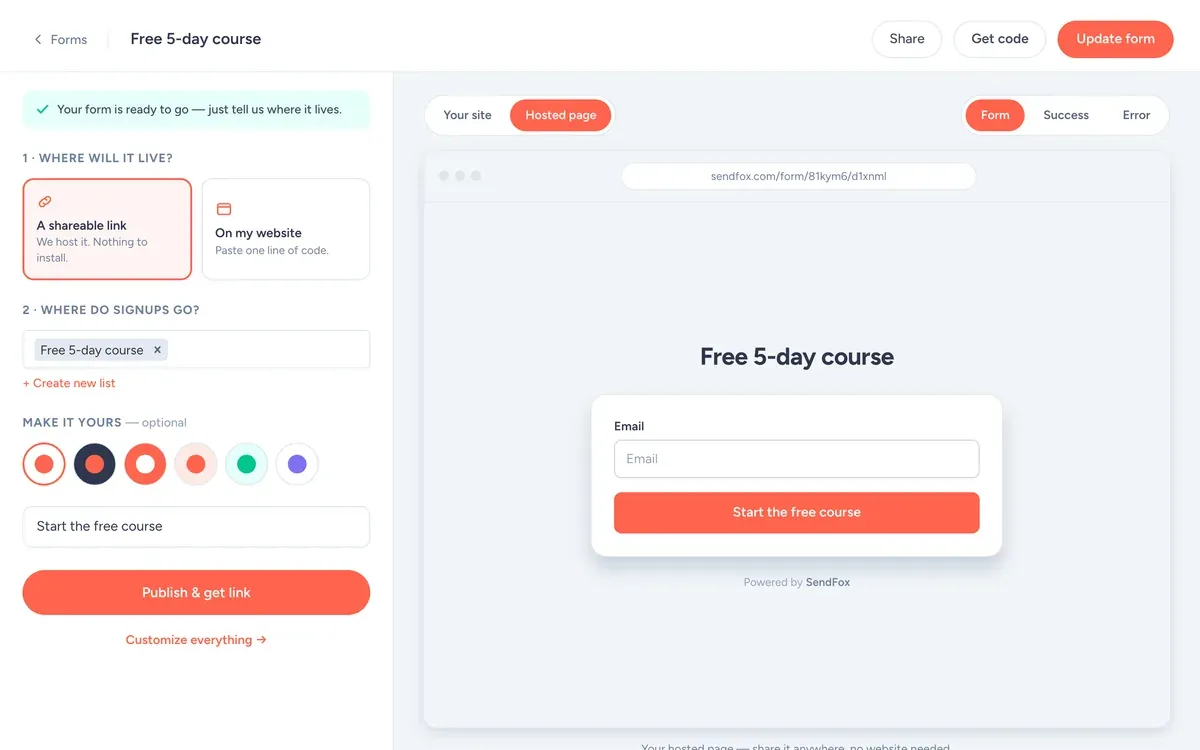
The form, field by field
- Fields: Email only. Every extra field costs signups.
- Button: "Start the free course"
- What they get: A free 5-day email course: build your freelance budget in Google Sheets.
- Where signups go: the Free 5-day course list, which starts the welcome automation.
Use it as a hosted link (your bio, a QR code, the back of a book) or paste one line of code to put it on your site.
Best email tools for course creators
I make SendFox, so it's listed first. Each tool below says what it does better than us. Prices are at 5,000 subscribers. How we checked.
| # | Tool | Best for | At 5,000 subscribers |
|---|---|---|---|
| 1 | SendFoxBest value | Free email courses and launches on a budget | $29 once |
| 2 | Kit | A digital product store inside your email tool | $89/mo |
| 3 | GetResponse | Selling courses through webinars | $54/mo |
| 4 | ActiveCampaign | Branching automations and a sales CRM | $145/mo |
| 5 | MailerLite | Selling digital products from email | $49/mo |
01 SendFox Best value
- Price
- Free to 1,000 contacts. $29 once for 5,000. Pro from $19/month.
- Moves
- Imports from Mailchimp, Kit, Google Contacts or a CSV
Good
- Free for 1,000 contacts and 3,000 sends a month
- $29 once for 5,000 contacts and 300,000 total sends
- Smart Pages and subscriber referrals on every plan, RSS-to-email from the $29 plan
Not so good
- The $29 plan has a send pool. Weekly to 5,000 people uses it in about 13 months, then you move to Pro
- No CRM or sales pipeline
- Paid newsletters and removing branding need Pro
02

- Price
- $89/month at 5,000 (Creator). Free to 10,000 without automations.
Good
- Recommendations network and newsletter sponsorships
- Free plan up to 10,000 subscribers
- Store for digital products built in
Not so good
- The first welcome sequence needs a paid plan
- Takes 3.5% plus 30 cents per sale
- Bills for subscribers who stopped opening
03

- Price
- $54/month at 5,000 (Starter).
Good
- Webinars on the Creator plan
- Abandoned-cart emails and funnels
- Advertises a 50% nonprofit discount
Not so good
- Starter has 1 custom automation
- Free plan has no autoresponders
04

- Price
- $145/month at 5,000 (Plus, paid yearly).
Good
- CRM next to your email, with pipelines and lead scoring as an add-on
- Branching automations
- Predictive sending and conditional content on Pro
Not so good
- Prices shown are yearly only
- New accounts are billed for every contact, whatever their status
05

- Price
- $49/month at 5,000 (Comfort).
Good
- Website and landing page builder included
- Preference center and 100+ integrations
- Sells digital products and bookings
Not so good
- Free plan is now 250 subscribers
- Comfort caps you at 10 emails per subscriber a month
- Jumps to $89 at 10,000
Lists and tags, with exact names
Create these on day one, with these exact names, so every email has an obvious place to go.
Free 5-day courselistThe free course automation runs off this list.
StudentslistBuyers only. They stop getting launch emails.
clicked-launchtagPeople who clicked the doors-open email but didn't buy. Answer their questions first.
Start with the free course, not the paid one
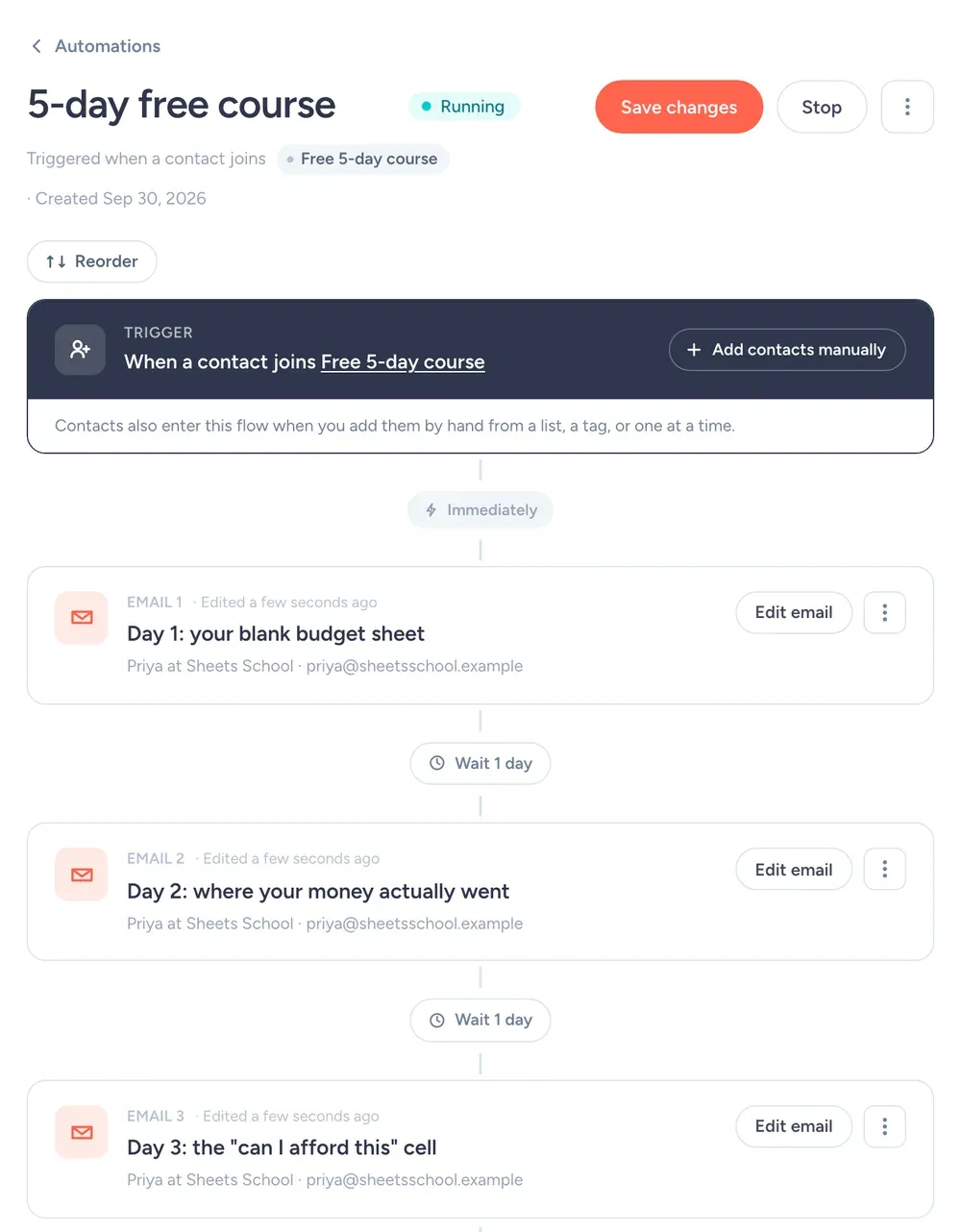
A 5-day email course is the best lead magnet a teacher can have. It shows how you teach before anyone pays you. In SendFox it's one automation triggered by joining the "Free 5-day course" list, with a 1-day delay between lessons. The first three steps look like this:
- Right away"Day 1: your blank budget sheet"A template link and one 10-minute task.
- 1 day later"Day 2: where your money actually went"Categories and the SUMIF that fills them.
- 1 day later"Day 3: the "can I afford this" cell"One formula that answers the question. Days 4 and 5 follow the same way.
Keep each lesson under 300 words and give one task. If day 1 takes an hour, nobody opens day 2. Free includes 1 automation, so this is where it goes.
Then send one teaching email a week
Here's the rule: 90% teaching, 10% selling. Every week, one useful thing. When you launch, people already trust you because you've been helpful for months.
Weekly beats monthly. Monthly newsletters get forgotten, and then the launch email lands on people who don't remember signing up.
A weekly email, start to finish
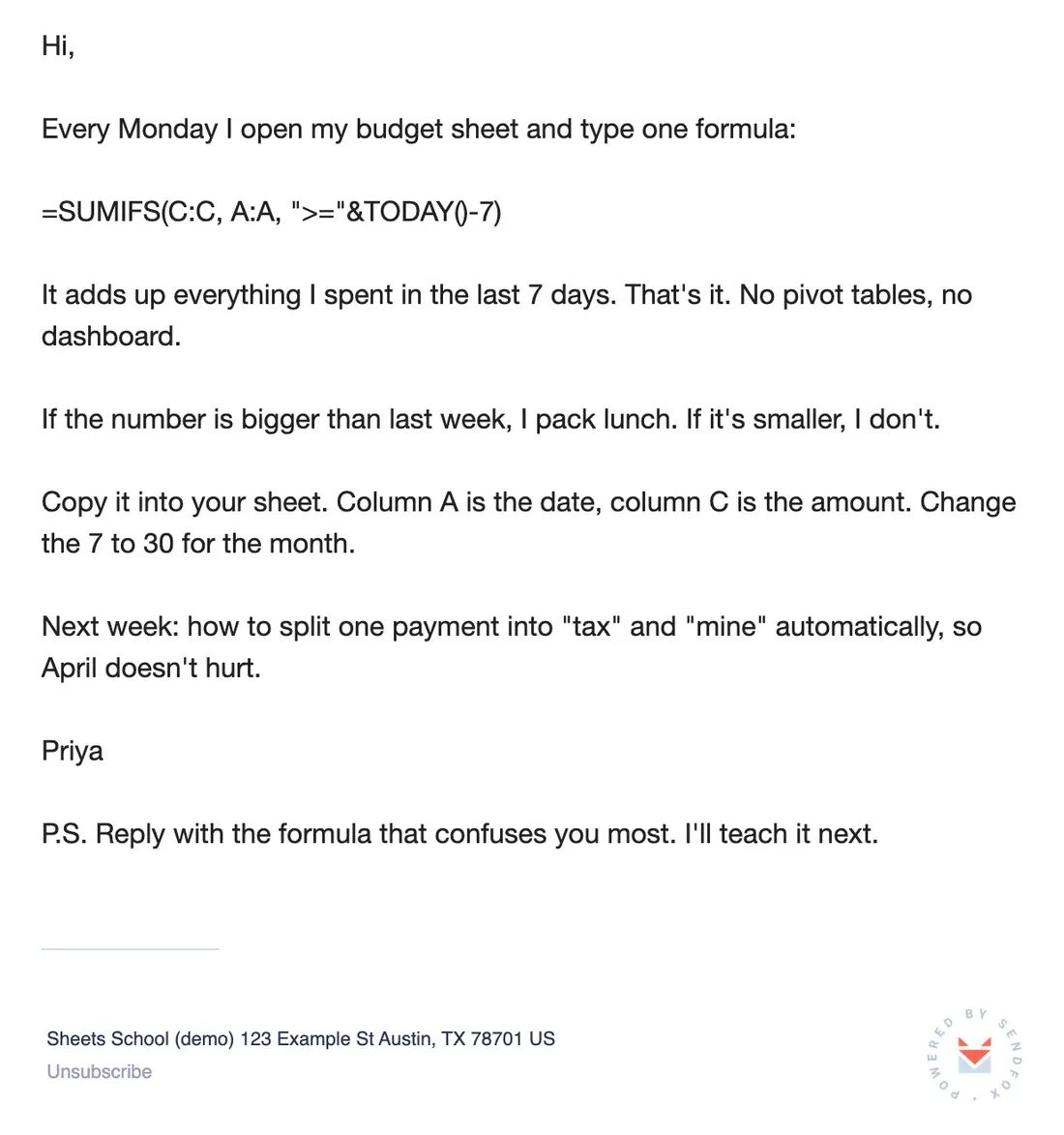
Priya's Monday email. One trick, something they can use in 30 seconds, and a teaser for next week.
Copy the text of this email
Hi,
Every Monday I open my budget sheet and type one formula:
=SUMIFS(C:C, A:A, ">="&TODAY()-7)
It adds up everything I spent in the last 7 days. That's it. No pivot tables, no dashboard.
If the number is bigger than last week, I pack lunch. If it's smaller, I don't.
Copy it into your sheet. Column A is the date, column C is the amount. Change the 7 to 30 for the month.
Next week: how to split one payment into "tax" and "mine" automatically, so April doesn't hurt.
Priya
P.S. Reply with the formula that confuses you most. I'll teach it next.
Sell twice a year, teach every week. If every email is a pitch, your launch lands on people who stopped opening months ago.
From the SendFox teamSubject lines
A launch week, with real dates
Priya launches twice a year. Here's October:
- Mon Oct 5
Normal teaching email. At the bottom: "Doors open next Monday."
- Mon Oct 12
Doors open. What's inside, who it's for, the price, the link.
- Wed Oct 14
Answers to the 5 questions people replied with.
- Fri Oct 16
Doors close tonight. Short.
- Sat Oct 17
Students list only: welcome and the first live call date.
Use "resend to non-openers" on the doors-open email two days later. Plenty of people just missed it.
Say your list is 1,500 people. If 40% open the doors-open email, 600 people read it.
If 2% of the whole list enroll, that's 30 students from one launch week.
Rough math, not a promise. Round numbers for illustration; they aren't SendFox data, and your list will do its own thing.
What SendFox does here (and what it doesn't)
Automations with delays
The free course.
Free: 1 · Lifetime & Pro: unlimitedLists
Import buyers from your course platform as a CSV into "Students", so they stop getting launch emails.
Free: 3 lists · Lifetime & Pro: unlimitedSmart Pages and forms
The free course signup page, or a form embedded on your site.
Free: 1 · Lifetime & Pro: unlimitedAI email writer
Paste a lesson and get a draft email to edit. Free accounts get 2 drafts to try.
Free: 2 drafts to try · Lifetime & ProWhat it doesn't do
Host videos or take course payments. Keep that on your course platform.
Settings for a course list
| Setting | What to set | Why |
|---|---|---|
| From name | Priya at Sheets School | Sheets School is the brand, but people reply to Priya. |
| From email | An address you actually read | Replies go to your from address. Replies are the best signal you'll get. |
| Send time | Monday, 8am | A formula to use this week fits the start of the week. Campaigns schedule in your time zone. |
| Double opt-in | Leave it on to start | Confirmed subscribers mean fewer typos and fake signups. Single opt-in is available on Pro, or on Lifetime after a one-time domain setup. |
| Lists and tags | Free 5-day course, Students, clicked-launch | So each email goes only to the people it's for. What each one is for is spelled out in the lists and tags section. |
| Engaged only | On for promos, off for must-read news | It sends only to people who opened in the last 90 days or joined recently. |
| Footer | Nothing to add | SendFox adds your mailing address and an unsubscribe link to every campaign. You'll need to enter your address before your first send. |
What it costs
Free
1,000 contacts, 3,000 sends a month. 1 Smart Page, 1 form, 1 automation.
Lifetime
5,000 contacts and 300,000 total sends. Unlimited automations, Smart Pages and forms.
Pro
From 5,000 contacts and 100,000 sends a month. Paid newsletters, teammates, no SendFox branding.
| Plan | Price | Contacts | Sends | Smart Pages, forms, automations |
|---|---|---|---|---|
| Free | $0 | 1,000 | 3,000 / month | 1 of each |
| Lifetime | $29, once | 5,000 | 300,000 total | Unlimited |
| Pro | From $19 / month | 5,000 to 250,000 | From 100,000 / month | Unlimited |
Free and Lifetime emails carry a small SendFox footer; Pro removes it. Pro also adds paid newsletters on your own Stripe account and teammates. Lifetime and Pro get the full API and MCP server; Free gets a limited set. Current plans: sendfox.com/pricing.
A free course, a students list and two launches a year fit on Lifetime: $29 once for 5,000 contacts and unlimited automations. Past that, Pro starts at $19/month.
How that compares to 12 other tools at 5,000 to 100,000 subscribers: email marketing pricing compared.
How we checked
Every price comes from the vendor's own pricing page, read on October 14, 2026, at monthly billing unless noted. We priced each tool at 5,000, 10,000, 25,000, 50,000 and 100,000 subscribers on the plan named in the table. The ranking is for course creators who email one list regularly. Nobody paid to be on this list. SendFox prices come straight from our billing system, so they match what you will pay.
FAQ
Can I deliver a free email course with SendFox?
Yes. Build it as an automation that starts when someone joins a list, with a delay between each lesson. Free includes one automation; Lifetime and Pro include unlimited.
Does SendFox host courses?
No. SendFox is for email. Host lessons on your course platform and use SendFox to grow the list, run launches and email students.
How do I keep students and leads apart?
Use separate lists. Export buyers from your course platform as a CSV, import them into a Students list, and send launch emails to everyone else.
What does SendFox cost for a course creator?
Free for 1,000 contacts and 3,000 sends a month. $29 once for 5,000 contacts and 300,000 total sends. Pro from $19/month when you need more.
Copy this setup this afternoon
Free for 1,000 contacts. $29 once for 5,000. Import from Mailchimp, Kit or a CSV.
Free up to 1,000 contacts. No card.
Keep reading
Featured newsletters link to public creator pages and public emails. The walkthrough and screenshots use a fictional SendFox demo account, before any emails were sent.