Best email marketing for coaches
Give away a worksheet that solves one small problem. Send one short email a week with one idea and one story. Invite people to a call once a month, not every email. SendFox is free up to 1,000 contacts, then $29 once for 5,000.
Free up to 1,000 contacts. No card.

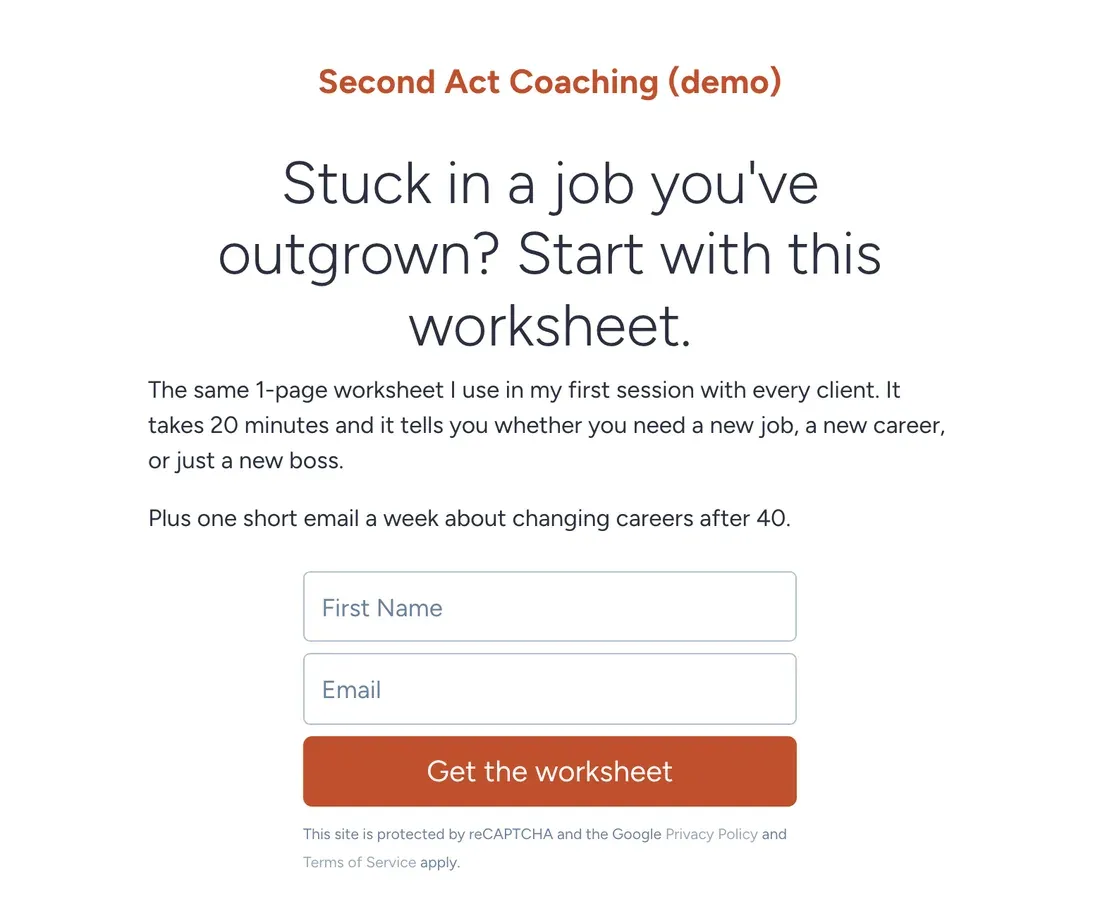
SendFox is the best email tool for most coaches: a signup page, a welcome series that warms people up, and a call invite at the end of it. It's free for 1,000 contacts and $29 once for 5,000. Pick MailerLite if you want to sell bookings from your email tool, ActiveCampaign if you run a sales pipeline, and GetResponse if webinars are how you sell.
People hire a coach they already trust. Trust takes about a dozen emails. It doesn't take one clever LinkedIn post.
The example here is Dana from Second Act Coaching, a made-up career-change coach for people over 40. Dana isn't real. The emails and the setup are real, and every screenshot is SendFox.
What a good weekly email looks like
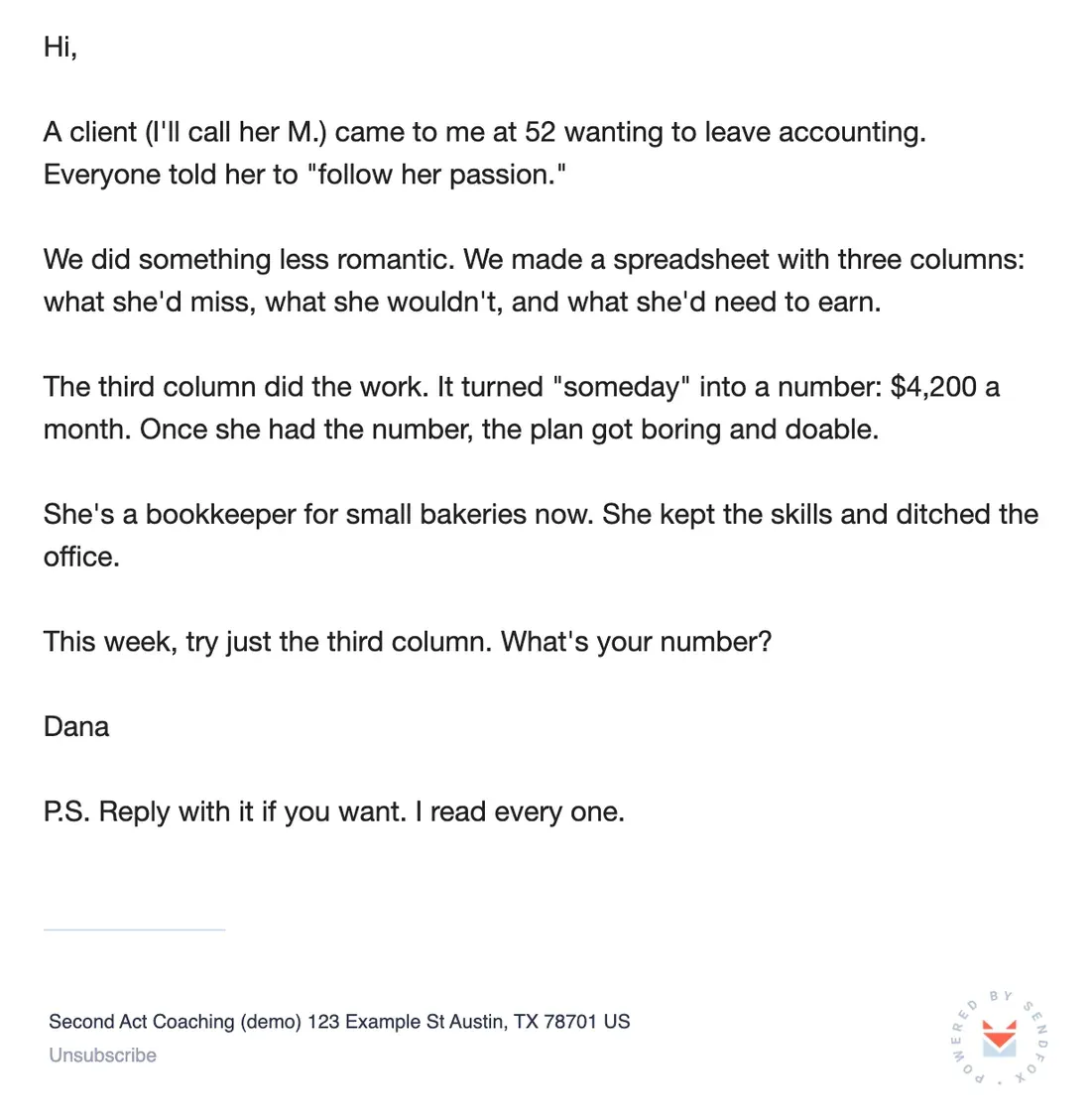
Most coaches write emails like a LinkedIn carousel. Five tips. A quote. A call to action. Here's Dana's instead: one client story (anonymized, with permission), one idea, one question.
It's about 140 words. You can write one in 20 minutes if you stop trying to sound like a coach.
Copy the text of this email
Hi,
A client (I'll call her M.) came to me at 52 wanting to leave accounting. Everyone told her to "follow her passion."
We did something less romantic. We made a spreadsheet with three columns: what she'd miss, what she wouldn't, and what she'd need to earn.
The third column did the work. It turned "someday" into a number: $4,200 a month. Once she had the number, the plan got boring and doable.
She's a bookkeeper for small bakeries now. She kept the skills and ditched the office.
This week, try just the third column. What's your number?
Dana
P.S. Reply with it if you want. I read every one.
Best email tools for coaches
I make SendFox, so it's listed first. Each tool below says what it does better than us. Prices are at 5,000 subscribers. How we checked.
| # | Tool | Best for | At 5,000 subscribers |
|---|---|---|---|
| 1 | SendFoxBest value | Coaches who want a list that books calls | $29 once |
| 2 | MailerLite | Selling bookings and digital products from email | $49/mo |
| 3 | Kit | Selling digital products to your list | $89/mo |
| 4 | ActiveCampaign | Coaches with a sales pipeline and a CRM | $145/mo |
| 5 | GetResponse | Selling through webinars | $54/mo |
01 SendFox Best value
- Price
- Free to 1,000 contacts. $29 once for 5,000. Pro from $19/month.
- Moves
- Imports from Mailchimp, Kit, Google Contacts or a CSV
Good
- Free for 1,000 contacts and 3,000 sends a month
- $29 once for 5,000 contacts and 300,000 total sends
- Smart Pages and subscriber referrals on every plan, RSS-to-email from the $29 plan
Not so good
- The $29 plan has a send pool. Weekly to 5,000 people uses it in about 13 months, then you move to Pro
- No CRM or sales pipeline
- Paid newsletters and removing branding need Pro
02

- Price
- $49/month at 5,000 (Comfort).
Good
- Website and landing page builder included
- Preference center and 100+ integrations
- Sells digital products and bookings
Not so good
- Free plan is now 250 subscribers
- Comfort caps you at 10 emails per subscriber a month
- Jumps to $89 at 10,000
03

- Price
- $89/month at 5,000 (Creator). Free to 10,000 without automations.
Good
- Recommendations network and newsletter sponsorships
- Free plan up to 10,000 subscribers
- Store for digital products built in
Not so good
- The first welcome sequence needs a paid plan
- Takes 3.5% plus 30 cents per sale
- Bills for subscribers who stopped opening
04

- Price
- $145/month at 5,000 (Plus, paid yearly).
Good
- CRM next to your email, with pipelines and lead scoring as an add-on
- Branching automations
- Predictive sending and conditional content on Pro
Not so good
- Prices shown are yearly only
- New accounts are billed for every contact, whatever their status
05

- Price
- $54/month at 5,000 (Starter).
Good
- Webinars on the Creator plan
- Abandoned-cart emails and funnels
- Advertises a 50% nonprofit discount
Not so good
- Starter has 1 custom automation
- Free plan has no autoresponders
One story beats five tips. Every time.
From the SendFox teamSay you have 600 readers. If 45% open the monthly call invite, 270 people see it.
If 1% of the whole list book, that's 6 discovery calls from one email. For a solo coach, that's a good month.
Rough math, not a promise. Round numbers for illustration; they aren't SendFox data, and your list will do its own thing.
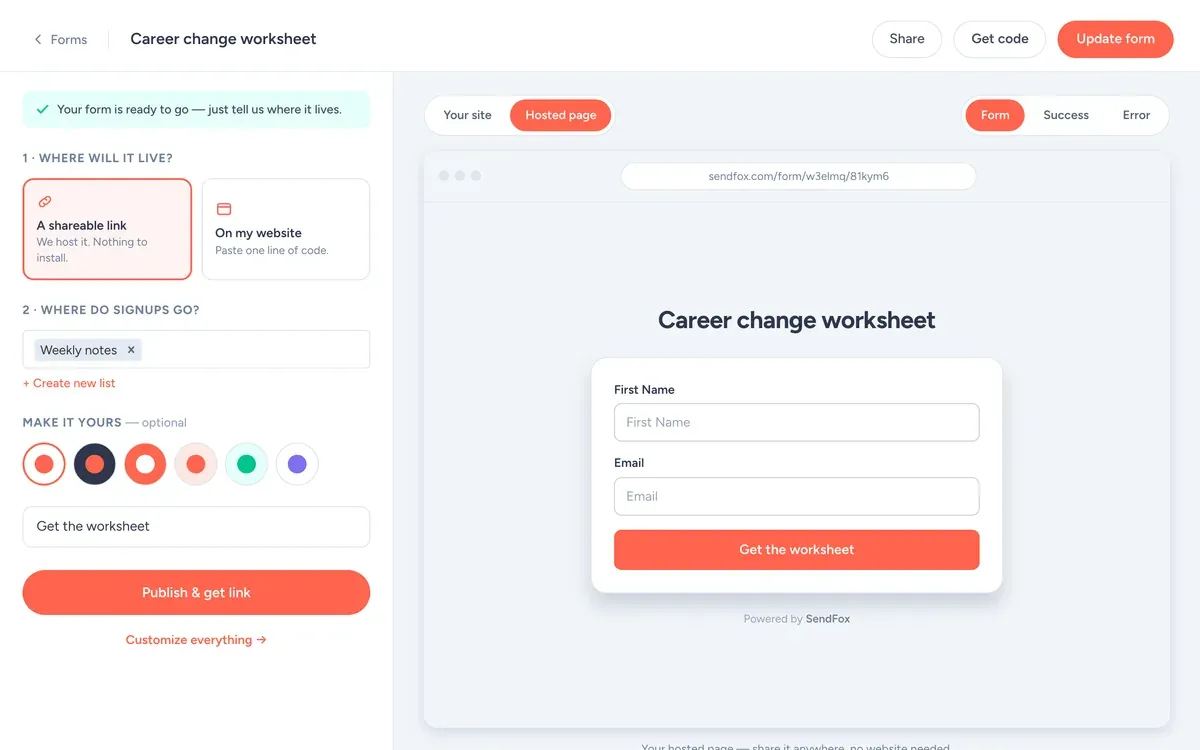
The signup form
- Fields: First name and email. Every extra field costs signups.
- Button: "Get the worksheet"
- What they get: The 1-page career change worksheet Dana uses in every first session.
- Where signups go: the Weekly notes list, which starts the welcome automation.
Use it as a hosted link (your bio, a QR code, the back of a book) or paste one line of code to put it on your site.
The first automation: worksheet, story, then the call
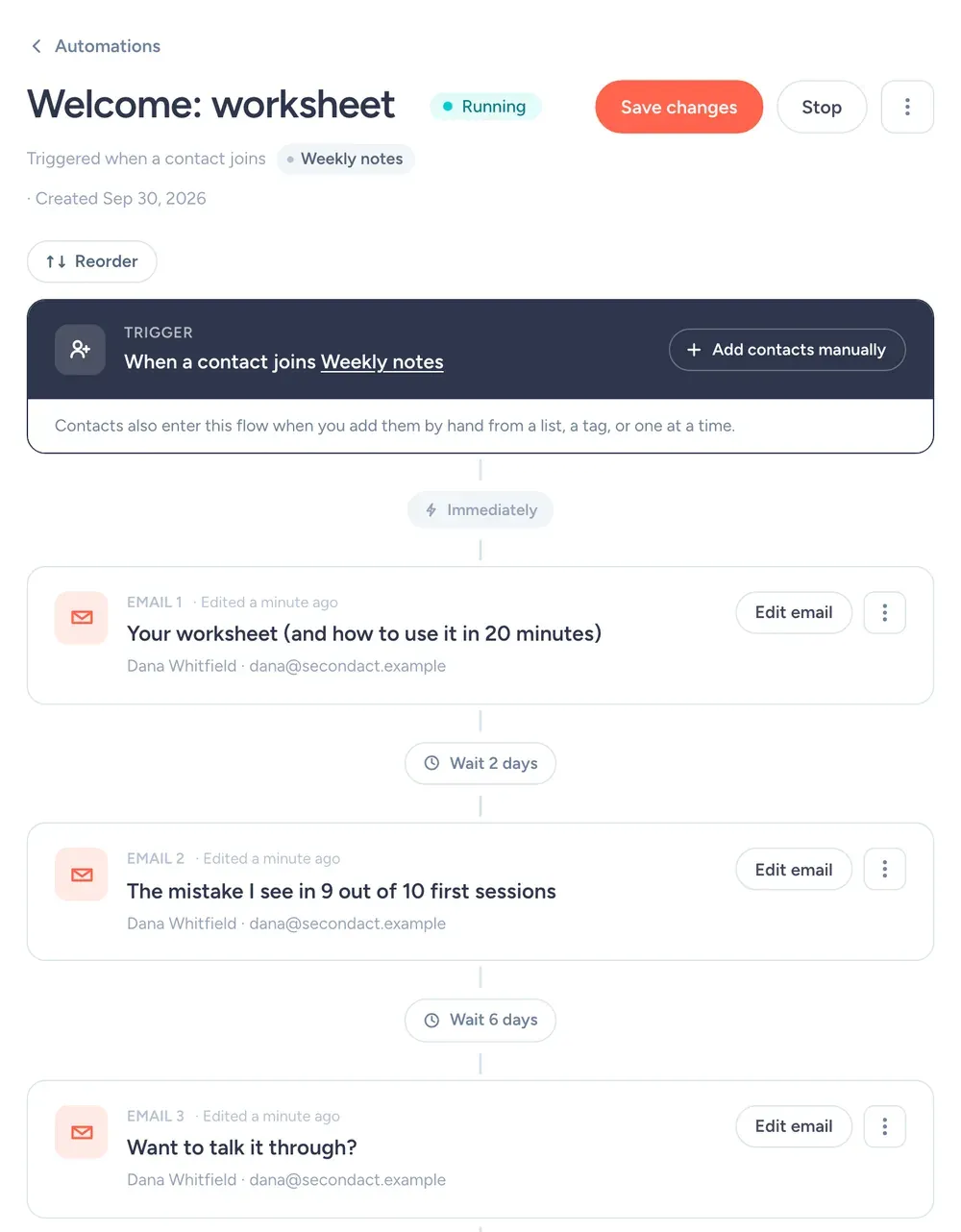
It runs when someone joins the Weekly notes list. The discovery call invite waits until email three, after they've used the worksheet and heard a story.
- Right away"Your worksheet (and how to use it in 20 minutes)"Delivers the worksheet with a 3-step how-to.
- 2 days later"The mistake I see in 9 out of 10 first sessions"A story and one lesson. No pitch.
- 6 days later"Want to talk it through?"One paragraph about the free 20-minute call and a link to book it.
Lists and tags to create
Create these on day one, with these exact names, so every email has an obvious place to go.
Weekly noteslistEveryone who downloads the worksheet.
ClientslistSession reminders and group-session logistics.
call-bookedtagAnyone who booked a discovery call, so the invite stops going to them.
Dana's October
- Tue Oct 6
Weekly note: the spreadsheet story above.
- Tue Oct 13
Weekly note: "How to explain a career change in an interview."
- Tue Oct 20
Weekly note plus the monthly call invite. 3 free call slots.
- Thu Oct 22
Clients list only: reminder about the group session.
- Tue Oct 27
Weekly note. Asks readers what they're stuck on.
Same day every week. Tuesday at 7am works for Dana's crowd. Pick a slot and stick to it so people start expecting you.
Subject lines that sound like a person
If a subject line could be on a motivational poster, rewrite it.
SendFox features a coach will use
A Clients list
Session reminders go to clients only, and prospects don't get them.
Free: 3 lists · Lifetime & Pro: unlimitedScheduling
Batch a month of Tuesdays in one afternoon.
Every planSmart Page
The worksheet signup page, which doubles as the link you give on podcasts.
Free: 1 · Lifetime & Pro: unlimitedStop sending "value bombs"
A lot of coaching newsletters are a list of seven tips, a quote and a button. They read like they were written for an algorithm, and people treat them that way.
Write to one person. Pick a real client question from this week and answer it like you would on a call. If you catch yourself typing "in this fast-paced world", delete the sentence and start with the story instead.
Keep the pitch out of most emails. When every email ends with "book a call", nobody books a call. Once a month is plenty, and it works better because it's rare.
Settings for a coaching list
| Setting | What to set | Why |
|---|---|---|
| From name | Dana Whitfield | Clients hire Dana, so the emails come from Dana. |
| From email | An address you actually read | Replies go to your from address. Replies are the best signal you'll get. |
| Send time | Tuesday, 7am | Early enough to read before work, and not Monday, when inboxes are at their worst. Campaigns schedule in your time zone. |
| Double opt-in | Leave it on to start | Confirmed subscribers mean fewer typos and fake signups. Single opt-in is available on Pro, or on Lifetime after a one-time domain setup. |
| Lists and tags | Weekly notes, Clients, call-booked | So each email goes only to the people it's for. What each one is for is spelled out in the lists and tags section. |
| Engaged only | On for promos, off for must-read news | It sends only to people who opened in the last 90 days or joined recently. |
| Footer | Nothing to add | SendFox adds your mailing address and an unsubscribe link to every campaign. You'll need to enter your address before your first send. |
Cost
Free
1,000 contacts, 3,000 sends a month. 1 Smart Page, 1 form, 1 automation.
Lifetime
5,000 contacts and 300,000 total sends. Unlimited automations, Smart Pages and forms.
Pro
From 5,000 contacts and 100,000 sends a month. Paid newsletters, teammates, no SendFox branding.
| Plan | Price | Contacts | Sends | Smart Pages, forms, automations |
|---|---|---|---|---|
| Free | $0 | 1,000 | 3,000 / month | 1 of each |
| Lifetime | $29, once | 5,000 | 300,000 total | Unlimited |
| Pro | From $19 / month | 5,000 to 250,000 | From 100,000 / month | Unlimited |
Free and Lifetime emails carry a small SendFox footer; Pro removes it. Pro also adds paid newsletters on your own Stripe account and teammates. Lifetime and Pro get the full API and MCP server; Free gets a limited set. Current plans: sendfox.com/pricing.
Most solo coaches stay under 5,000 contacts for a long time. That's $29 once on Lifetime. Under 1,000, Free covers it.
How that compares to 12 other tools at 5,000 to 100,000 subscribers: email marketing pricing compared.
How we checked
Every price comes from the vendor's own pricing page, read on October 14, 2026, at monthly billing unless noted. We priced each tool at 5,000, 10,000, 25,000, 50,000 and 100,000 subscribers on the plan named in the table. The ranking is for coaches who email one list regularly. Nobody paid to be on this list. SendFox prices come straight from our billing system, so they match what you will pay.
FAQ
What is the best email marketing platform for coaches?
A simple one you will actually use every week. SendFox gives coaches a signup page, a welcome automation and scheduled sends. It is free for 1,000 contacts, then $29 once for 5,000.
How often should a coach email their list?
Weekly. Invite people to book a call about once a month, not in every email.
Can I link my booking calendar in emails?
Yes. Paste your booking link into any email as a button or a text link.
Can I email only my current clients?
Yes. Put clients on their own list and send session updates to that list only.
Copy this setup this afternoon
Free for 1,000 contacts. $29 once for 5,000. Import from Mailchimp, Kit or a CSV.
Free up to 1,000 contacts. No card.
Keep reading
The example senders on this page are made up. The screenshots are from a SendFox demo account set up to match them, before any emails were sent.