Feature by feature
The plan each of us would sell you at 5,000 contacts.
5,000contacts |
 Mailchimp
Standard |
 SendFox SendFoxLifetime |
|---|---|---|
| Price | $100 / month | $29, once |
| Contacts | 5,000 | 5,000 |
| Email sends | 60,000 / month | 300,000, no monthly cap |
| AI features | Intuit Assist (beta & select countries) | AI writer, AI subject lines, fully fleshed MCP |
Why people leave Mailchimp
You pay for people who left
Mailchimp counts subscribed, unsubscribed and non-subscribed contacts toward your plan limit. Clean your list or keep paying for ghosts.
The free plan is tiny
Free stops at 250 contacts. Most people outgrow it before their first real newsletter.
Overages
Go over your contact or send limit and Mailchimp adds charges. Its pricing page says so in plain text.
As of Sep 2026, from mailchimp.com.
If you send a newsletter and nothing else, Mailchimp is a lot of software to pay for every month.
What you'd pay over 1, 2 and 3 years
Mailchimp
Standard1,000 contacts
5,000 contacts
10,000 contacts
Mailchimp Standard, monthly billing, regular price after any intro discount, as of Sep 2026. SendFox assumes one email a week to your whole list; if Lifetime's send pool runs out at that pace, the chart switches you to the cheapest Pro tier that fits.
Switching in an afternoon
Most people do this on a Sunday with a coffee. Here's the whole thing.
- Export a CSV from Mailchimp. In Mailchimp, go to Audience, then Export audience, then Export as CSV.
-
Import it into SendFox. Open the import screen, choose Upload a file, pick a list and map the columns. Or skip the CSV and connect Mailchimp directly from the same screen.

The SendFox import screen. -
Recreate your signup form. Pick a hosted link or paste one line of code on your site, and choose which list signups go to. Swap the old form on your site for the new one.
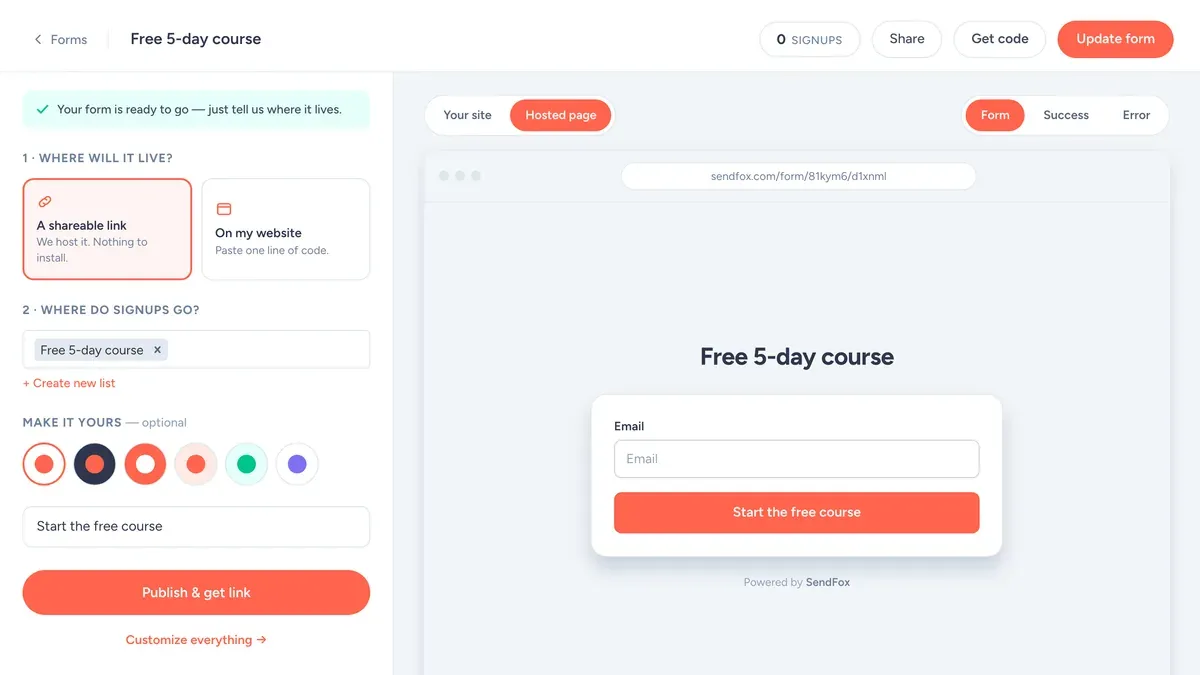
The SendFox form builder: where it lives, where signups go, what the button says. -
Rebuild your welcome email and re-send it. Create an automation triggered when someone joins your list and paste in your welcome emails. Then use "Add contacts manually" to drop your imported list in, so everyone gets a friendly hello from your new sender instead of a surprise.
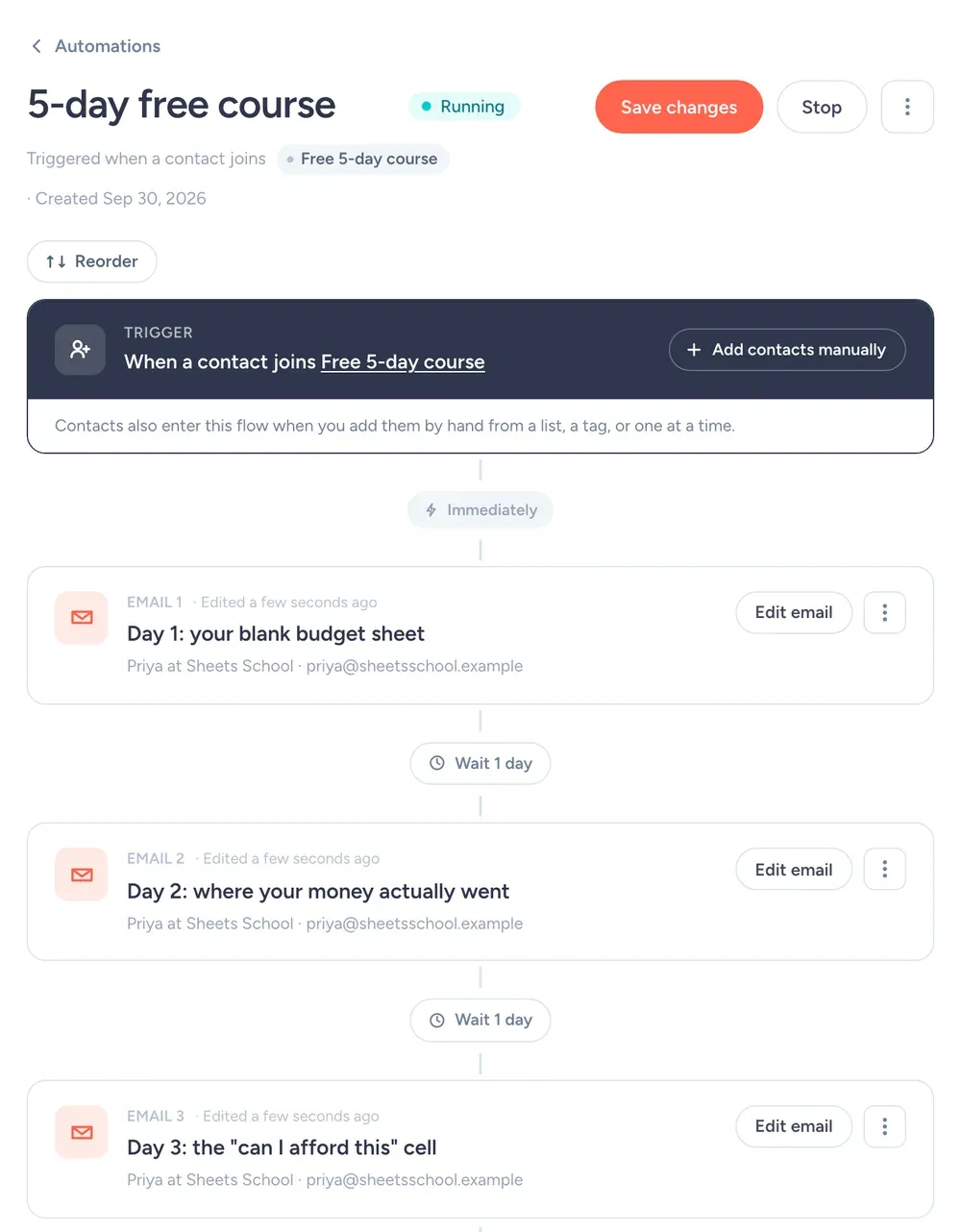
A 3-email welcome automation in SendFox (from a demo account). - Send your next newsletter from SendFox. Then cancel Mailchimp once you've checked the first send landed.
When Mailchimp is the better pick
We'd rather you pick the right tool than switch and regret it. Mailchimp is the better call when:
- You run an online store and want deep ecommerce integrations and product recommendations in email.
- You want a huge template library, custom-coded templates and popup forms in one place.
- Your team already lives in Mailchimp reports and switching costs more than the bill.
More comparisons
SendFox vs Kit · SendFox vs beehiiv · SendFox vs MailerLite · All comparisons →
SendFox vs Mailchimp: quick answers
Is SendFox a good alternative to Mailchimp?
Yes — if you send newsletters, SendFox is a simpler, far cheaper alternative to Mailchimp. It is free up to 1,000 contacts, then $29 paid once covers 5,000 contacts and 300,000 total email sends. Mailchimp bills per contact every month and its price rises as your list grows.
How much does Mailchimp cost compared to SendFox?
At 5,000 contacts, Mailchimp Standard costs $100 a month — $1,200 a year (mailchimp.com/pricing, monthly billing, September 2026). SendFox Lifetime covers the same 5,000 contacts for $29, paid once. Above 5,000 contacts, SendFox Pro plans are flat monthly prices starting at $19.
Can I import my Mailchimp contacts into SendFox?
Yes. Connect your Mailchimp account or upload a CSV export, and your contacts come over with their lists and tags. The import takes about two minutes.
Does SendFox have a free plan?
Yes. SendFox Free includes 1,000 contacts and 3,000 email sends a month, with no credit card required — and real humans answer support on every plan, including Free.