
Happy Sunday 📚,
Hope everyone had a lovely and productive week 🐝
Since the start of the new year, I’ve been trying to cut down my screen time. Last year, I was averaging around 4 hours and 30 minutes a day, and my goal is to bring that down to 3 hours. It’s been a bit tricky, especially with my job since I get a lot of calls and texts throughout the day, but I’ve made some solid progress. After doing some research, I came across a ton of helpful tips for reducing screen time, and the ones that stood out to me the most were small phone setting that make your phone less appealing to use. My original plan for this weeks newsletter was to do a "Top 5 Phone Settings!", but after my first draft I realized it would be too lengthy of an email. So were going to break it up! Below are 3 of my favourite tips for reducing screen time! Hopefully you like them, because you're getting three more next week!
Productivity Hack: Phone Settings 📴
Grayscale Mode:
This tip is #1 for a reason — it’s a game-changer. If you’re serious about cutting down your screen time, switching your phone to grayscale mode is a guaranteed solution. Phones have a setting that removes all color from your display, leaving everything in black and white (Usually found in the Display and Text Size setting). I wont lie to you, its not appealing. It make your entire phone seem dull and lifeless, but that's the point!
I tested this out for two weeks, and my screen time dropped by over an hour each day. Social media felt dull, YouTube videos lost their spark, and I found myself reaching for my phone less and less. Even tapping my phone to look at the notifications reminded me that I wanted to decrease my phone time and helped me put it back down. I knew it was keeper when it stopped me from even unlocking my phone in the first place.
I'd consider this one the biggest sacrifice of my list. Not many people can guarantee that a trick will work, but let me tell you this is 100%. You're going to get some weird looks when you show your friends a photo, and your nighttime YouTube video is gonna make you question your weird algorithm, but I promise you'll have put that phone down faster then ever before. Also, someone had asked me how screenshots work, so I tested it out for myself. Happy to say that the screenshots still show up in colour on someone else's phone! I took a screenshot of my home screen so you can see for yourself:
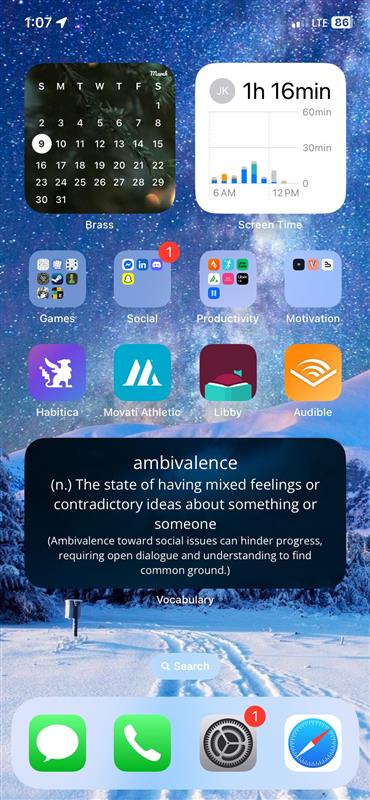
A Simple Home Screen:
This is another subtle but powerful way to reduce screen time — declutter your home screen. Try removing as many app icons as possible from your main screen. Years ago, this would’ve been a hassle since deleting an app meant re-downloading it every time you wanted to use it (Which honestly isn't a bad idea 💡). But now you can remove the icons without deleting the app itself, meaning you’ll have to manually search for it each time you want to open it. This works in two big ways:
- First, you’ll forget about half the apps you used to open out of boredom. All the games that you play between scrolling sessions or when your bored in the car will completely vanish from your routine.
- Second, your phone will start to feel like a tool instead of a source of entertainment. With a cleaner screen and fewer distractions, you’ll naturally spend less time on your phone — and more time being present.
Social Media Logins:
This one’s for the social media scrollers in the crowd. The first step is to log out of all your accounts. The key here is to uncheck the “Stay signed in” box when you log back in. This means every time you want to open the app, you’ll have to manually enter your username and password.
It sounds small, but the impact is huge. I came across a lot of stories for people who did this and noticed that half the time they didn’t even bother logging in. They realized they were about to start mindlessly scrolling and decided it wasn’t even worth it to type a password in. Like 60% of the time they didn't even realize they had clicked on the app in the first place! It was just a bad habit that they always fell on when there wasn't immediately something in front of them. By logging out, you create a built-in pause, forcing you to ask yourself: “Do I actually want to use this right now, or am I just bored?” You don’t have to quit social media entirely, but this trick helps you break the habit of unconscious scrolling.
And that's the first half of my setting hack! What’s your daily screen time looking like these days? Are you happy with it, do you have a target you’re aiming for like me? If you end up trying any of the tips above, shoot me a message! I'd love to hear how its going 😊
Business Update💼
Last week, I was away for three days on a work conference (a lovely trip to Niagara Falls), so I didn’t get as much done on the book as I hoped. That being said, I feel like I’m making great progress. Right now, there are about 60 original pages that need to be created before I can start the editing process, and I’ve officially hit 45 pages. That puts me around 75% done with the first draft! Of course, I know the editing process is going to be a beast, so I’m not expecting the same progress once I get there. But for now, I’m feeling good about the momentum.
One thing that gave me a massive boost this week was a trip to Starbucks with two friends from university. Both of them are super talented with design and Canva (the platform I’m using to create the book), so I thought, why not get some feedback? It was the first time I showed anyone my work, and my god they did not take it easy on me. After 4 hours of getting blasted for my word choices, designing flaws and doing Canva "The difficult way", I walked away with a Word document filled with edits, design tips, and fresh ideas that will really take the book to the next level.
The biggest piece of advice I got from that session was about tailoring the design for my audience. Its not all about the words and questions I ask, the overall vibe is a huge factor that'll affect how someone feels about picking up the book. I realized really quickly that I need to use fonts that feel mature yet inviting, colors that keep the pages from feeling dull, and small design elements that add fun without looking childish. I’m horrible at judging this kind of thing, but luckily that’s what friends are for.
I said this in my last letter, but I would love to get as much "tough love" as I can on this, so if you're interested in looking at my document and sharing any tips that come up, shoot me a message! I'm happy to send it over to anyone and everyone that's willing to give it a go (Ill even buy ya a coffee if your interested).
For this week, I’m locking in on finishing the final 15 pages. It’s been tough resisting the urge to go back and make small edits on pages I’ve already done, but I know that getting the first draft fully complete is way more important right now. It’s a strategy I picked up from the book "Million Dollar Weekend" by Noah Kagan. The whole idea is to take action fast without worrying about perfection on the first try. The momentum will carry you further than perfection ever will. So that’s the plan - finish the draft, then attack the edits!
Jake's Schedule🖊️
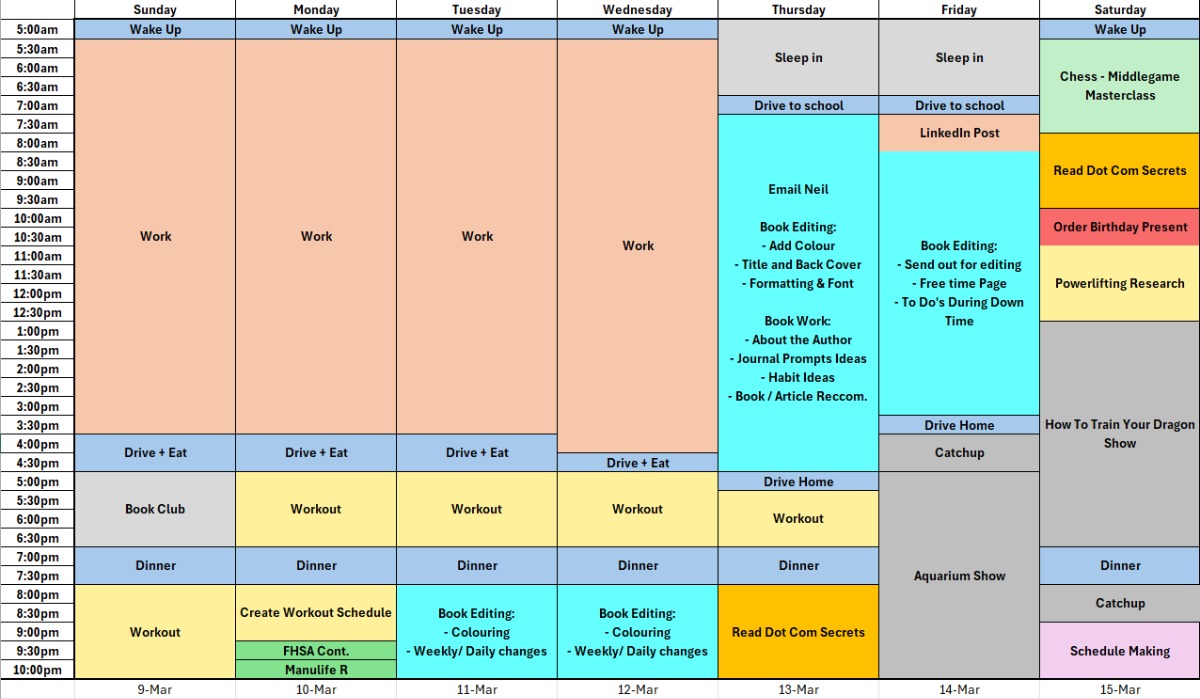
Back to my regular schedule after a fun week in Niagara Falls! I have a few events with friends Friday and Saturday, but otherwise looking to be a productive week! I've been thinking about training for a powerlifting competition recently, so my main focus (Other than my book/ business) is to up my workout routine 🏋️. Working on my business has been a lot of fun but having a goal without visible milestones and achievements can make it hard to feel like your winning. That's why I want to reincorporate a physical goal back into my life. I picked powerlifting because its something I've never done before, and it has clear goals ahead. How fast can I increase my combined lifts after a week? A month? The Year? Of course Bee Routine comes first, but exercising and staying healthy will always be a close second. I've already planned two workouts this week with friends that are big lifters, so that they can teach me how to better my form on things like squat and deadlifts.
Wish Me Luck,
Jacob Kadar
0 comments