
Happy St. Patrick's Day 🍀
Hope everyone had / will have a safe weekend (Please drink water 😅)!
As I mentioned last week, this will be a part 2/2 for productive phone settings. Wanted to shout out the few of you that reached out to me about using the grayscale mode on your phone 😂. I know it takes some getting used to, and is a little sore on the eyes, but props too all of you that tried. I gave the setting a full week before making the call on keeping it. I've settled on an in-between state of on and off. I'm happy to leave it off when I know I have some time to spare, but I put it back on anytime I lock into work. As promised, below are another 3 top tier settings for your phone that I think you'll love. Looking forward to hearing your thoughts!
Productivity Hack: Phone Settings 📴 (Part 2!!!!!!)
Notification Settings:
You probably saw this one coming, but seriously, turn off your notifications. Before you do though, here’s a fun experiment: count how many notifications you get in a day. Ask yourself...did I actually need to see every single one of these in real-time? Chances are, the answer is no. Actually, I just about guarantee its a no. I realized how bad my notification problem was during a workout this week. In a 90-minute gym session, I got over 20 notifications, all of which interrupted my music. Halfway through my sauna session, I’d had enough. I opened my notification settings and started the purge, app by app. Some of them felt hard to disable in the moment… but a week later? I couldn’t even remember which ones I turned off. That’s how little they actually mattered.
I’m not saying you need to turn off everything, but aim to cut your notifications by at least 50%. Your group chats, random app alerts, marketing notifications.. you get the point. The less your phone buzzes, the less you’ll feel the urge to check it, and that’s a major win for reducing screen time. If you do nothing else from this list, do this one. You’ll be amazed at how much quieter (and less distracting) your day feels.
Using Widgets (The Useful Way):
One of my favorite phone hacks is filling my home screen with widgets instead of apps. It takes up space (so you’re not tempted to fill your screen with distracting apps) and actually serves a purpose. I personally have three widgets that help me stay productive:
- Daily Screen Time Tracker – This is my favorite. It’s a constant reminder of how much time I’ve spent on my phone, and it definitely keeps me in check. If my screen time creeps past two hours, I’ve caught myself turning my phone off and plugging it in just to avoid hitting my 4-hour daily limit.
- Word of the Day – A fun way to keep my brain active throughout the day.
- Calendar – Because I can never remember what day of the week it is.
Similar to the social media log out tip I used in my previous email, the Screen Time Tracker is the real game-changer. It forces you to be aware of how much time you’re spending on your phone. It’s like a mental countdown, the higher my screen time gets, the more motivated I am to put my phone away.
There are tons of other useful widgets you can add depending on your goals. Some good ones I’ve seen others use include:
- Weather app ⛅– Quick glance at the weather without opening any apps.
- Notes 📒 – Jot down thoughts or reminders.
- Habit Tracker 📚– I’m currently using Habitica (its like a habit tracker and a game)
- Todoist ✅– Similar to a notes app but more structured for daily tasks and reminders.
REMEMBER the goal here is to fill your screen with tools, not distractions. It’s a small shift that can make a huge difference in how you use your phone. Let me know if you have any other fun widgets that you find helpful throughout your day!
App Limits:
A lot of you have heard about this setting, but I haven't heard of many people that actually use it. One of the few settings that are built into phones that are actually meant to get you off of it is app limits. This allows you to set time restrictions on individual apps on your phone. You can typically find it in Settings -> Screen Time -> App Limits. My favourite part about the restrictions is that you can group apps into categories like "Games, Social, Entertainment, etc" so that you can limit say Social Media scrolling to two hours a day. Its especially nice when you're scrolling at the end of the day. Just when you've lost all concept of time, and cant remember the previous video without going back, POP! A notification is in your face saying its past your bed time. While I don't use social media very much, I have a big limit for games, and even text messaging. I have a bad habit of answering work texts and calls 24/7 so keeping a limit on my texting reminds me to put my phone down and that anything work related can be answered tomorrow.
Have you ever tried any of these? Do you currently keep any app limits on your phone?
Business Update💼
I was hoping to finish the rough draft of my book this past weekend but unfortunately I was unsuccessful. I went to the library all day Thursday and Friday to crank it out, but got distracted with editing and started making small touch ups to the pages I had made the week prior. And before you say it... Yes that is exactly what I told myself not to do at the end of last week. I'm not proud of it, but that's how it goes. Nothing we can do now but carry on. On the bright side, I did make a few pages and was able to condense some of the ones I had previously game planned for. In total I'm looking at about 50 original pages, of which 43 have been created (some of which are already edited I guess 🤦♂️). That puts me at about 86% of the way done.
While I'm not on a time crunch, I do feel like I'm a bit further behind then I would like to be. I have a busy week ahead of me, but I want to set a few goals for myself so you can all keep me accountable come next Sunday. My top 3 goals are as follows:
- Finish the rough draft of my book
- Find a manufacturer and order my first sample
- Create an Amazon Seller account and set up a business bank account
If I can get all 3 of these done, I would consider it a huge success! I've already set up a meeting with a banker, and reached out to a few manufactures to see which one I might work with best! Wish me luck!
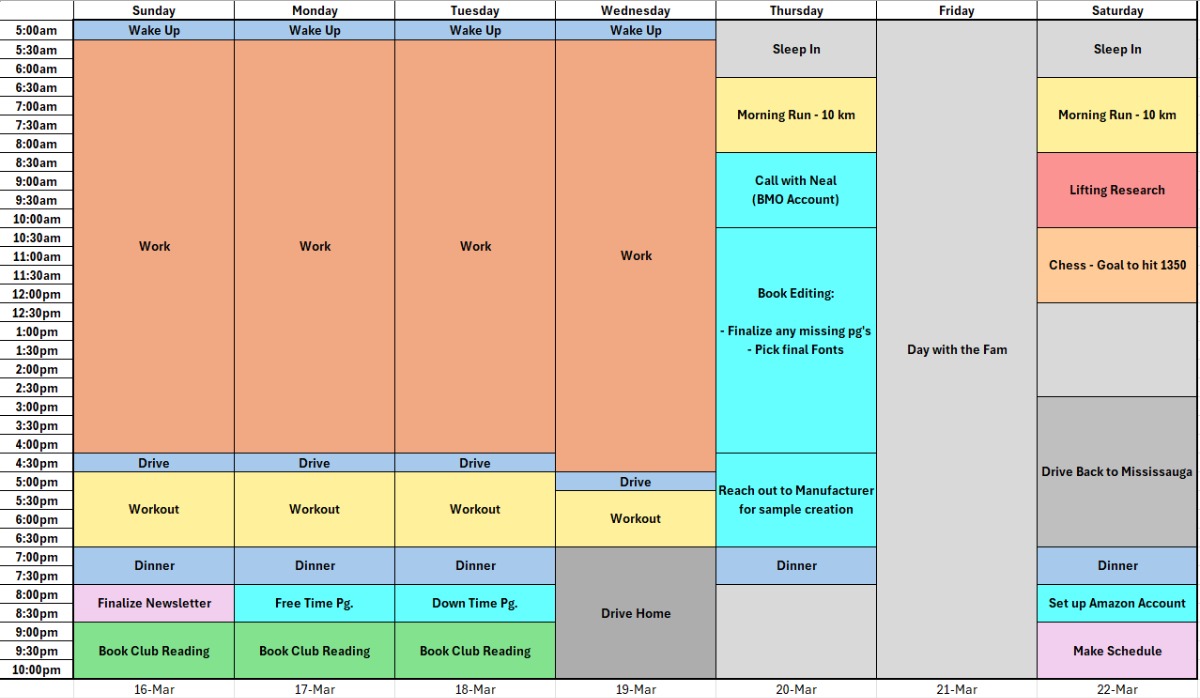
Jake's Schedule🖊️
Busy week ahead. I have a long and stressful day Wednesday (If you know you know), but after that Ill be driving back home to good ol' Belle River. I haven't seen the fam since New Years, so I scheduled lots of time to catch up with everyone. Luckily for me they will all be working Thursday, so I'll have some free time to get my own work done! Hope you all have a splendid week!
Stay Lucky, Stay Productive ☘️
Jacob Kadar
0 comments