
Happy Sunday 📚,
Before I get into the nitty gritty of my first newsletter, I just wanted to say thank you again for joining! I told myself earlier this week that it'd be okay to send out my first newsletter without a single subscriber because it was more about being consistent, rather than trying to gain a following. But here we are! With about 10 subscribers going into today, let's give it a go!
If you read my welcome letter, you'll recognize the format below, but in case you skipped it, here's a reminder! I plan to break my newsletters down into 3 sections:
- A productivity trick I use
- An update on the business I'm working on
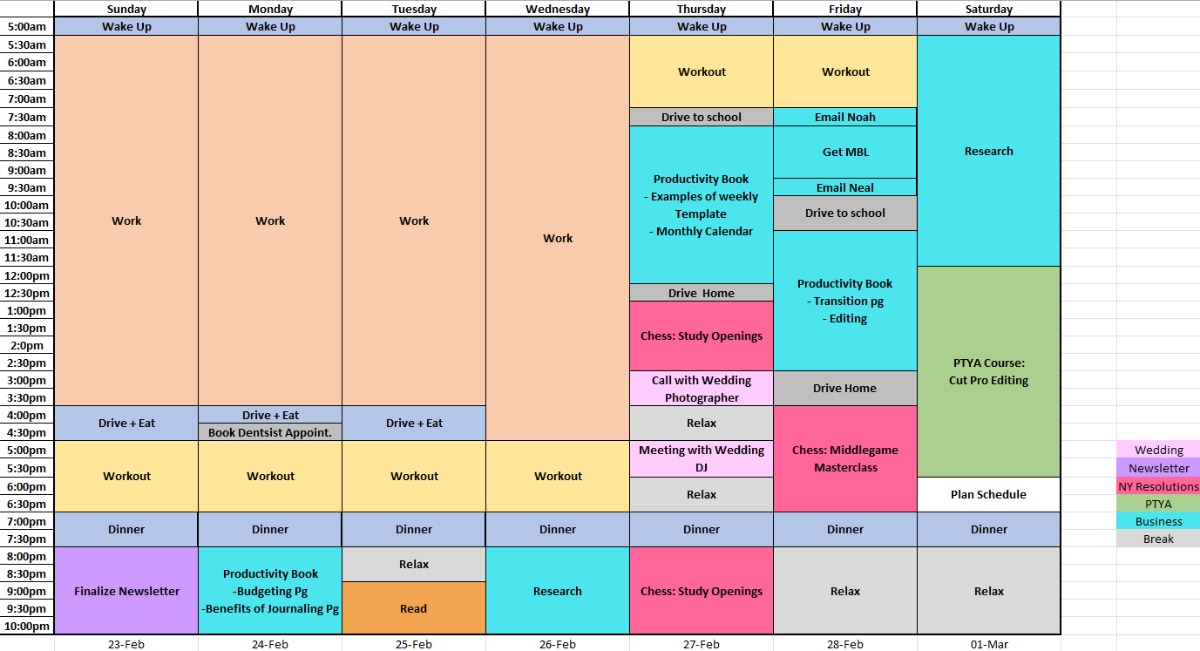
- My weekly schedule
This way you'll get the productivity tips you're all here for, but still be able to keep up to date on my entrepreneurial journey. Apologies in advance if this is a long one (Can you tell I'm nervous).
This Week's Productivity Hack: Time Blocking 📅
I wanted to start my first newsletter with my favourite productivity hack of all. Those that work with me, or have studied with me a lot in school will recognize this one well. This scheduling trick has been gaining a lot of popularity over the past couple of years. It's also the same method I use for my weekly schedule, so I figured it's a nice way to kill two birds with one stone.
Time blocking is a productivity technique where you schedule specific blocks of time for different tasks or activities throughout your day, instead of working from a long to-do list. This is done by allocating set periods of time for work, meetings, breaks, or even personal time. This method helps improve efficiency and clarity as you always know what you should be working on and for how long. Many people like using Google Calendar, or Outlook to create this template. This allows you to connect your entire weekly plan to your phone, or smartwatch, leaving room for a lot of reminder notifications (If you need it). I use Excel because I don't feel the need to get notification reminders, and it helps me stay off my phone during the day.
If you want to set up your own time-blocked calendar (Which I highly recommend), I suggest you start by creating your weekly template, along with your to-do list. Your template should only involve things that are consistent on a week-to-week basis. Good examples would be the time you wake up, when you're at work, what time you exercise or go to the gym, etc. Once your template is made, estimate how much time each task on your to-do list will take, and start slotting them into the open availabilities in your calendar. (See my schedule for reference)
Business Update 💼
Now that you all know about my secret project (Bee Routine), I can tell you all about what I'm doing. Warning ⚠️ If you ask me any questions about this, I will ramble! I'm super excited to start my project, even if it won't be the most successful or profitable business plan. Bee Routine is a productivity-based business. I'm currently working on the first product, which is a Productivity Journal 📕. Eventually, I would love to roll out a few products, along with a service to help people plan their weeks and stay on task with their goals (Basically like a business coach, but for personal goals).
That's a lot of info that will most likely take me a long time to turn into reality. For now, my primary goal is to create my own productivity journal! One that anyone could use to plan and reflect on both a daily and weekly basis. Right now, I feel like I'm writing a book from scratch (Which I kinda am) which both stresses me out and excites the hell out of me.
I tried attaching my first draft to this email, but quickly realized I'm not able to include pdf's to my newsletters. Unfortunate! If you're interested in looking at my first draft, shoot me a message, I'd love to get feedback! However, I'm going to defend myself in advance! I've never used Canva, and I've never created a journal before. All that being said, I'm really looking for feedback on the layout/ template. If you think of any recommendations (no matter how harsh), please reach out! Overall, I'm looking for the journal to span about 3 months (A 90-day Productivity Journal). Between the daily setup, reflection pages and everything in between, I'm guessing it will be about 250 pages.
Jacob's Schedule 🖊️
Not much to talk about here, but I've attached my weekly schedule for this week (Feb 23rd - Mar 1st). If you're looking to time block yourself, or just curious as to what I'm up to, feel free to give it a look. Again, I use a self-made Excel version because I'm not a huge fan of official calendars, but 99% of people who time block use Google Calendar. If you have any questions about my thought process or template, feel free to send me a message.
I hope you all have a productive week!
Best,
Jacob Kadar
0 comments