Hi ,
A lot of bakers were quite excited to effect the necessary changes as discussed in my previous email and I hope you have done yours already.
In addition to the features to set up on the front end/page profile, also remember to add your phone number and email. I have received several international calls from prospects who visited my Instagram page and found my phone number.
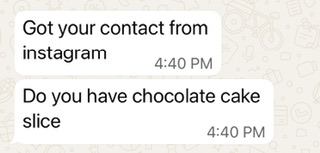
Orders like the one in the image below is as a result of a well set up page that is ready for business.
INSTAGRAM BACK END SET UP
Today we are delving into the back end set up. There are three important features you need to fix here: saved replies, auto replies and frequently asked questions (FAQs).
These are automated.
They appear when a prospect wants to send you a DM or has already sent you one.
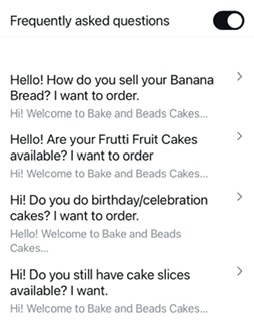
Frequently asked questions are the common enquiries your customers usually make. There are usually only four (4) spaces for questions.
Auto replies are instant replies sent to a prospect when you are not available online
While saved replies are the instant answers to your frequently asked questions.
LET’S GO PRACTICAL!
To set up these features do the following:
1 Go to your instagram page profile, tap on the three lines by the top right corner.
2 Tap on “account type and tools”
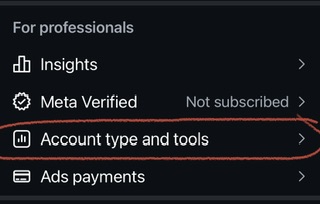
3 Then tap on “messaging tools”
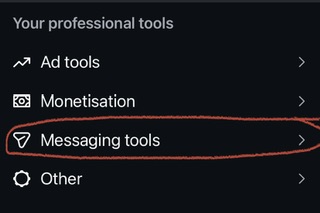
4 You will see all the features I talked about. Tap on each of them to write your preferred messages.
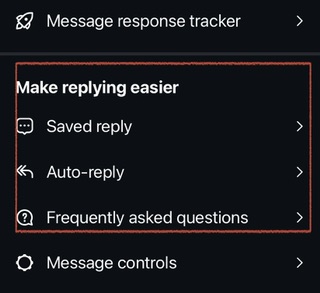
FAQs and saved replies are great for products that have a distinct price example, box of 12 donuts, pack of 4 banana bread etc
Here’s an example of mine:
FAQ
“Hello! How do you sell your Banana Bread? I want to order.”
SAVED REPLY
“Hi! Welcome to Bake and Beads Cakes.
Thank you for your interest in our delicious Banana Bread.
Our Banana Bread comes in a 4-in-1 mini mix.
A 4-in-1 pack is N8,000
🏅We offer immediate delivery services as you order, so you don’t have to stress yourself or wait endlessly for a preorder.
How many packs would you like to order and where’s your delivery location?”
So when a customer taps on their preferred FAQ, it sends to my DM as a message and then the saved reply for that FAQ automatically sends to them as my response even when I’m not online. By the time I come online, which shouldn’t take long, I take up the chat from there. On my academy page, I include account details in the saved reply for easy online course enrollments.
Here’s what a screenshot of the FAQs of one of my pages look like. Remember to toggle on the button for it to be active.
For auto replies you can set up a simple waiting message notifying them of your work hours or when you are likely to be around to respond.
, do you have these features set up before now on your instagram back end?
Reply “Yes, I have it set up already" or “No, I am going to set it up immediately” so I will know we are making good progress.
What do you say? Should I do WhatsApp?
Sugar hugs 🤗
— Coach Miriam
0 comments