

Hi ,
Four-day weeks after a bank holiday always feel like trying to fit 10 pounds of potatoes into a 5-pound bag, don’t they? But here’s the good news: Working smarter—not harder—can save the day. Let’s dive into a few little tricks that make a big difference.
Sometimes it's the little things

- Align to the slide (great for centring) or to each other.
- Distribute to space objects evenly across the slide.
Perfect for flowcharts, workflows, or anything that needs to look just right without the fuss.
🎥 Watch the quick demo here (Let me know if you’d like a deeper dive!)
Ctrl and drag?
This one is a little tip that I love, but don't use often.
This one’s a sneaky favourite of mine. Need to copy cells in Excel?
Here’s how:
Hover over the edge of the cell (your cursor turns into a 4-headed arrow).
- Hold Ctrl, drag the cell to its new spot, and release the mouse first—then let go of Ctrl.
The cell copies like magic! (I may or may not have celebrated the first time I got this right.)
Should I record a video for this? Hit reply and let me know—if enough of you are curious, I’ll make it happen!
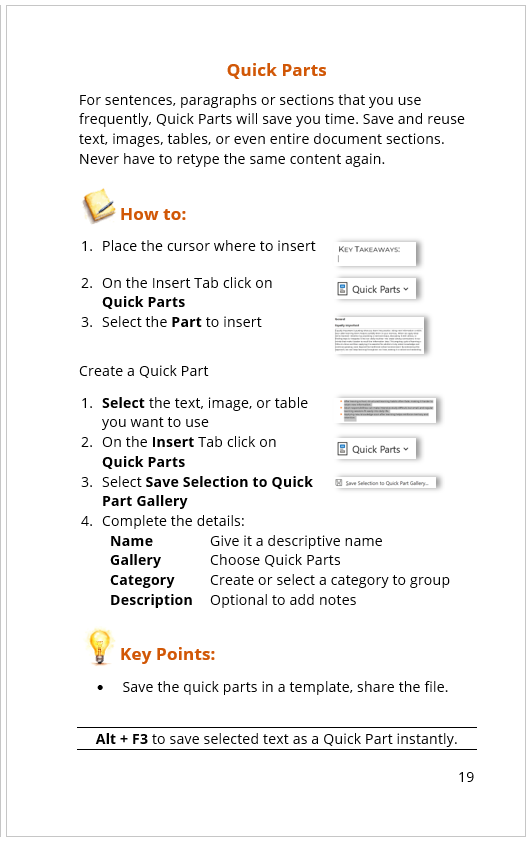 Upcoming
I’ve been busy putting together a small book of useful Microsoft Office features—one tip per page, easy to digest. Think of it as your cheat sheet for those “I know there’s a better way” moments.
(P.S. If there’s a feature or solution to a problem you’d love to see included, just reply and tell me!)
Thanks for reading!
Katherine
Business IT Training
0 comments