

Hey . Michael here.
Two updates today with one common thread: Giving you actionable information that you can use.
"Age Verification" is coming to an operating system near you. Where to find refuge?
Remember back in December last year when people in Australia & the UK needed to start proving they are over 16 to access social media?
Remember how I said at the time that this requirement will not just apply to social media platforms (and platforms in general) and will be quickly expanded to other aspects of our use of the Internet & technology in general?
Well, guess what? I was right yet again!
I HATE it when it happens (truly).
As usual though, while I was right, I was quite 'conservative' (pun absolutely intended) with my assessment of how quickly my 'predictions' (which are obviously not predictions at all) will come to pass and how bad things will get.
Not only has the requirement to verify your age been expanded to more countries and more platforms (including Substack in case you forgot), it has now been expanded to the 'engine' powering both your computer and smartphone/tablet: the Operating System itself.
In case you don't know anything about it, it all started when several US states passed legislation which requires providers of Operating Systems to ask for the age of the user as part of the setup process. This is what is known as "Age attestation" which means the operating system will ask you for a date of birth but will not necessarily verify that the date of birth you gave is indeed your real one.
Meanwhile, Brazil has gone one step further and introduced the requirement for "Age verification" for online platforms, app stores and...operating systems.
If you want to dig a bit deeper into the differences between "Age verification" and "Age attestation" and the legal implications of each, this is a good resource.
The Brazilian legislation mandates (i.e. it's not optional) that:
Operating systems and application stores incorporate reliable age verification mechanisms that are proportionate, auditable and technically secure
As far as how this will be enforced:
The public authority may act as a regulator, certifier or promoter of technical solutions for age verification, observing the limits of legality, privacy protection and fundamental rights provided for by law
But wait, there's more!
A bill with the very misleading name Parents Decide Act is currently making its way through Congress. It was introduced by two Republicans (i.e. "conservatives"): Josh Gottheimer and Elise Stefanik but enjoys bipartisan support which means it is almost certain to pass.
Once it does, it will be mandatory for operating system providers to verify the age of each US user regardless of which state they are in.
This is full verification rather than mere attestation and the bill nominates the FTC as the enforcer. They will be required to issue regulations within 180 days of the bill becoming law that will stipulate what verification mechanisms should be implemented and how the information collected should be secured. The latter doesn't matter because you hopefully know by now that there is NO WAY to keep personal information secure on the Internet...ever!
So both the US and Brazil are already implementing measures for Operating Systems. If the experience from the social media ban for teenagers is anything to go by, we know (with 100% certainty) that this will quickly spread to other jurisdictions.
So, what to do?
As is almost always the case, there are solutions to this problem but they will require you to make changes and be intentional and determined about doing so.
Switching Operating Systems on your computer is not an easy task and may require you to get used to new ways of doing things and maybe even change the software you currently use for various tasks.
Switching Operating Systems on your smartphone or tablet can be even more challenging and maybe even outright impossible if you have an iPhone or iPad. If that's the case, it may mean you will have to ditch your current mobile device altogether.
While this may sound very inconvenient and even outright difficult, I expect things to only get worse from here and unless you start preparing now, you may end up in situation where your only remaining options are:
Do things under duress; or
Comply and go through "papers please" in order to use your own device.
Neither are great.
The upside though is that if large number of people do indeed make those changes, the implementation of such invasive measures can be delayed at the very least.
Which operating systems are going to comply...or are already complying?
This page (which is updated regularly) provides a good rundown of the state of play.
As you'd probably expect, Microsoft (Windows), Apple (MacOS & iOS) and Google (ChromeOS & Android) are all onboard and have already committed to comply with any and all legislative requirements across the US, EU, UK or anywhere else they are introduced and are actually pre-empting things by rolling such measures globally, even in jurisdictions which do not (yet) have age "verification" or "attestation".
Which operating systems are refusing to bend the knee?
The above page is maintained by independent technology journalist and long time industry veteran Bryan Lunduke. Below you can watch a video in which he outlines which operating systems have expressly committed as of now to NOT comply with age verification or attestation measures:
As you can see from the video above and Bryan's list, the Operating Systems that have made it crystal clear that they will NOT comply with ANY measures of Age Verification or even Age Attestation have something in common: They are almost all some type of a Linux operating system.
Unfortunately, there are also plenty of Linux operating systems that DO plan to comply, with some already taking substantiative measures to do so.
In case you don't understand how such divergence is possible or don't know much about what Linux is, I have a big piece on the topic coming out soon. I was actually planning to have it out by now but this issue of "age verification" has put a major spanner in the works because I wanted to see how it will affect Linux before making any specific recommendations.
Given how significant of a task it is to switch operating systems, I wanted to see which operating systems will commit publicly to maintaining the privacy of their users and to allowing them to continue to use their own hardware as they see fit.
If you don't know anything about Linux, all you need to know for now is that it is:
Free (mostly);
Open source; and
Comes in many variations. These variations are known as distributions, or Distros for short.
The existence of these different distributions is the reason why there is such a variance in the approach to the issue of "age verification/attestation" (as well as many other things) across the Linux 'universe'.
Two specific distributions (distros) I recommend you consider
I will get into a lot more detail in my upcoming piece but for now, I can give you two specific options to start looking into so that you can start planning your 'escape' before the "age verification" tsunami hits.
I have decided to recommend these based on:
Their ease of use for complete beginners who have never used Linux;
Their FIRM stance against any and all measures of "age verification/attestation"; and
My own personal testing.
ZorinOS
This is a distro you may have already heard about because there was a lot of hype online about it when version 18 came out late last year.
The hype was mainly around how easy it is to use and how familiar the user interface (UI) and user experience (UX) is for people switching from Windows or MacOS who have never touched Linux before.
After over three months of testing ZorinOS myself on a 15 year old computer, I can definitely say that this hype is very much justified.
I will have a lot more to say on that in my upcoming piece but all you need to know for now is that ZorinOS DOES indeed look very familiar to anyone who has ever used Windows or MacOS and the learning curve once you switch is almost non-existent. This short video will give you an idea of what to expect:
Another great thing about ZorinOS is that it can run very well on computers with less powerful hardware or that are just older. As I said, I am running it on a 15 year old machine with ZERO issues.
If anything, if your Mac is relatively new and has a CPU (chip) made by Apple instead of Intel, it will actually make it harder for you to run ZorinOS on that machine.
Most importantly, ZorinOS have made their position on "Age verification/attestation" crystal clear:
We have no plans to introduce mandatory age or ID verification into Zorin OS.
As privacy and security are core values of Zorin OS, we're closely monitoring the unfortunate trend of new OS-level age verification laws and evaluating how we could avoid them infringing on our users' rights.
ZorinOS comes in three editions. Two are free and one is paid but even that one only includes open source software that you can easily install yourself free of charge. The paid edition is there for people who want to access technical support and help with installation, or simply want to support the project with a one-off donation.
One potential issue with ZorinOS is the fact that it is based on a Linux distribution called Ubuntu.
Ubuntu remain tight-lipped about what they plan to do around "Age verification". The company behind this distro also happens to be a WEF technology partner which is obviously of further concern.
If Ubuntu chooses to implement "age verification", ZorinOS will need to develop a workaround so that their software doesn't 'inherit' this feature from Ubuntu.
To make matters even worse potentially, Ubuntu itself is based on a much older Distro called Debian (the granddaddy of Linux Distros) and their public statements regarding "Age verification" leave a lot to be desired to put it mildly.
If, like me, this uncertainty concerns you, you may want to consider this next option instead.
Vendefoul Wolf Linux
While this distribution is not as easy to use for complete beginners as ZorinOS is, it is still very much beginner friendly, especially if you choose the Cinnamon user interface which is the same one used by Linux Mint, which was for years (and is still that to a large extent) the single most popular Distro for complete beginners.
Just choose the "Cinnamon Desktop" from the homepage.
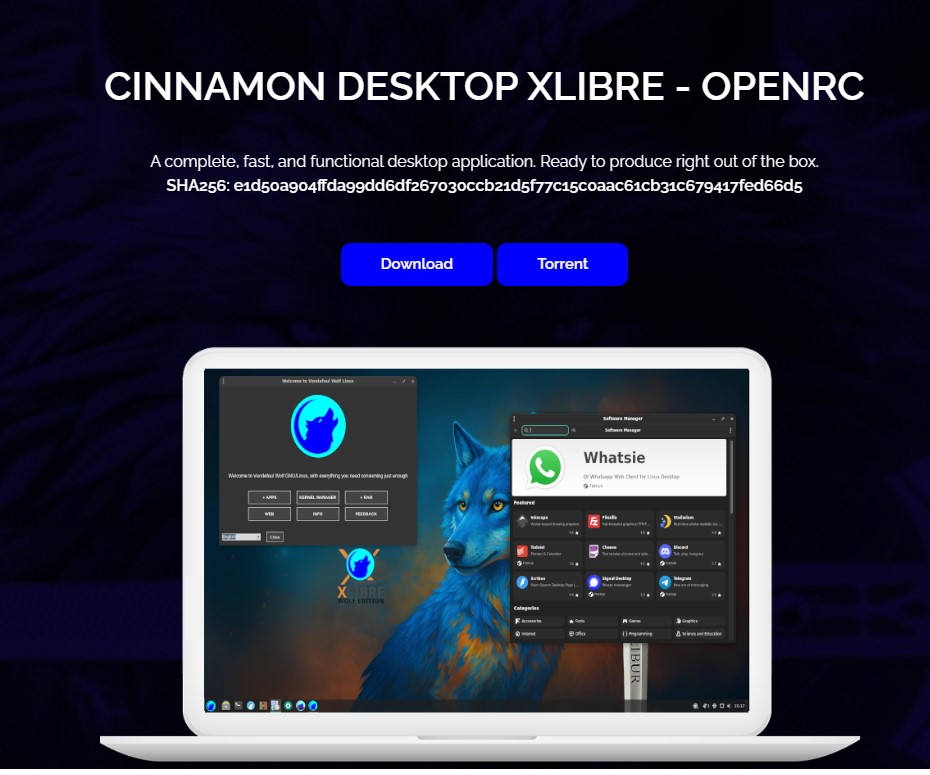
Vendefoul Wolf's stance towards Age Verification is much firmer than even Zorin's
Even more importantly, Vendefoul Wolf is built on a Distro called Devuan which in simple terms means that it is already positioned very well to ensure no "age verification/ attestation" ever makes it into the operating system.
As a further bonus, they have publicly committed to never allow AI-generated code (a.k.a. Vibe Coding) to be more than 10% of their operating system.
There is a lot to like about Vendefoul Wolf already but if you have a really old computer, there is also the further benefit that is extremely light on resources and hardware requirements, much more than even ZorinOS:
I can say based on my own personal testing (on that very same 15 year old computer) that even with the set-up discussed above, Vendefoul Wolf remains fairly easy to use for complete beginners while offering a modern and slick user experience.
What about smartphones?
If you have an iPhone, I'm afraid I don't have any good news or solutions for you.
Unfortunately, Apple has already introduced Age Verification into iOS since version 26.4 of that Operating System.
Furthermore, they have already started enforcing restrictions on users in Brazil, Australia, Singapore and the US states of Utah and Louisiana. People in these jurisdictions will not be able to install apps from the app store that are marked as 18+ unless they verify their age through the operating system.
As you can't really run an iPhone on anything other than iOS and Apple's enforcement of "age verification" will only get more draconian from here, it is time for you to start thinking about an exit strategy from Apple's ecosystem. Many current iPhone users are already planning to do just that.
If you use Android, things are not much better with Google already starting to enforce the same restrictions as Apple for installing Apps from its Play Store. While this doesn't yet apply worldwide, it will no doubt be the case sooner rather than later.
The good news is that if you happen to own a Pixel 6 or newer phone, you have a pretty solid 'escape hatch' available to you called GrapheneOS.
Not only is GrapheneOS much more secure and private than Google's Android, their stance regarding "Age Verification" is very clear cut and unambiguous with their public statement from March 20 this year reading as follows:
GrapheneOS will remain usable by anyone around the world without requiring personal information, identification or an account. GrapheneOS and our services will remain available internationally.
If GrapheneOS devices can't be sold in a region due to their regulations, so be it.
It doesn't get more clear cut than this and such a firm stance should absolutely not just be celebrated but also demanded from other operating systems.
Furthermore, Google will start forcing all app developers to provide government ID if they want to keep having their apps available through the Play Store. This will further accelerate the exodus from Android, especially if viable alternatives already exist (tick!) and there are already plenty of people waiting to support those developers who choose to make the move to something like F-droid or GrapheneOS instead of bending the knee (that part is up to all of us).
If you don't have a pixel device or don't want to fiddle around with installing GrapheneOS on it, you have two options:
Buy a second hand Pixel phone that already has GrapheneOS installed on it; or
Wait till next year when Motorola starts offering brand new phones with GrapheneOS pre-installed.
I know neither of these options are great or easy but the stance GrapheneOS is taking on this issue and the mere fact they exist, is definitely good news in my book.
Actionable Take is changing to better serve you
Following some feedback and further contemplation on my part, I decided that going forward the Actionable Take broadcasts will change as follows:
No more livestreams. All episodes will be pre-recorded;
This content will be available exclusively to paying subscribers (on any of the paid tiers); and
It is those paid subscribers who will decide what topic each Actionable Take will cover, as well as how often such Actionable Takes will be released.
#1 is the result of direct feedback I received with people struggling to make it to the Livestreams or finding it cumbersome to engage during a Live Broadcast.
#3 is also the result of direct feedback I received whereby some people felt they are a bit overwhelmed and feel they are unable to consume the Actionable Takes in a timely manner, and thus unable to gain the full benefit given Actionable Takes are often time sensitive in nature.
#2 is a decision by me given the amount of preparation and effort required on my part to research, prepare and record these broadcasts to a standard that I am happy with. In addition to that, there will also be an element of post-production involved in doing the Actionable Takes as these will no longer be merely livestream recordings.
Not sure if you realise it or not but I am a one man band and am doing all this on my own without any help from anyone (either human or AI) which means any time I put into doing this sort of work, takes away from time I can dedicate to paid work that actually pays the bills and puts food on the table.
I tried to avoid making this decision for as long as possible but as what I thought will be a sprint is clearly turning into a marathon, it becomes obvious that I can't sustain this level of time commitment and effort (which I have been maintaining for almost 3.5 years now) without more income coming in from this (very time consuming) work.
Given I vehemently refuse to accept advertising or sponsorships and/or shill for any corporate or state interests, the only income I get from doing this is through paid subscriptions.
While I will always aim to have most of the content I produce be available free of charge to everyone, I do need to make some changes in order to be able to keep doing this long term and also protect my work from being scraped by AI.
Putting the Actionable Takes completely behind a paywall is the first (and only at this stage) step in that direction.
If you are already a paid subscriber on either the website or the private community (thank you!), you will get an email in mid-July with a link to a private page where you can suggest topics for the next Actionable Take as well as the frequency you'd like to see these episodes being released.
This is so that you are not overwhelmed and have time to digest the content & implement any Actionable Takes that are applicable.
Once I have at least 3 topics proposed, I may add one of my own to the mix and then put all these to a vote to all the paid members.
The topic which gets the most votes will be the one I cover and each Actionable Take episode will always cover ONE topic only and be no more than one hour in length.
Mid-year Discount offer
If you are not yet a paying subscriber, I am announcing today a promotion whereby you can get 15% off when prepaying for 12 months in advance. This 15% discount applies for the first year only.
You prepaying for a year means I have more certainty which allows me to plan more content ahead of time and commit more resources (first & foremost being time) to researching, recording and producing the Actionable Takes.
Annual subscriptions always equal 10 months worth of monthly payments which means you are getting two months for free but for the next two weeks, you can get an extra 15% on top of that.
You can either sign-up through the website or the private community and the prices are the same in both cases.
However, if you sign-up through the private community, you also get a permanent discount on all the official merch (both existing and anything added in the future) so if that's something that is of interest to you, I suggest you go with the paid membership option through the Private Community.
Discounted paid membership through the website
Both the "Supporter" tier and the "Patron" tier already include the discount automatically applied so you don't need to worry about entering any discount codes.
Just choose any of the options below (turn on images if you can't see the buttons):
Discounted paid membership through the private community
If you decide to sign up through the private community, you will need to apply the discount code MIDYEAR to the checkout when signing up to either the Truth Seeker or Truth Brigade tiers.
You will find a field labelled "Enter promo code" in the checkout which is where you put the MIDYEAR promo code to get the discount.
Please remember that this promo code will only work if you choose the annual option.
You can click on any of the buttons below (turn on images if you can't see them) to be taken directly to the paid tier of your choice and see both the prices and the associated benefits for each. Remember that the initial prices you see do NOT include the discount. The promotion will be applied once you enter the promo code MIDYEAR.
If you are trying to sign up to any of the paid plans and can't get your discount or unsure about anything, just reply to this email and I'll help.
As I said already, this promotion runs for the next two weeks only and will end on July 14. I will also send another reminder email before the promotion for discounted paid memberships ends.
Thanks in advance for your support!
0 comments